Learning HTML Structure
HyperText Markup Language
HTML is a markup language that defines the structure of your content.
Which you use to enclose, or wrap, different parts of the content to make it appear a certain way, or act a certain way. The enclosing tags can make a word or image hyperlink to somewhere else, can italicize words, can make the font bigger or smaller.
What is Wireframing?
Wireframing is a practice used by UX designers which allows them to define and plan the information of their design for a website, app, or product. This process focuses on how the designer or client wants the user to process information on a site, based on the user research already performed by the UX design team.
- Wireframing lets you plan the layout and interaction of your interface. Start by drawing out ideas with paper and a pencil or on a whiteboard, once you have your ideas done then switch to the software later.
6 Steps to make a wireframe
1) Do your research
2) Prepare your research for quick reference
3) Make sure you have your user flow mapped out
4) Draft, don’t draw. Sketch, don’t illustrate
5) Add some detail and get testing
6) Start turning your wireframes into prototypes
How to make your wireframe good?
1) Make sure have good clarity
2) Ease of navigation through your site and clear calls to action increase Confidence
3) Simplicity is too much information, copy, or links can be very distracting to the user. You want your users to be able to find their way through your site.
- For more information click on the hyperlink.. Wire Frame
The opening tag: This consists of the name of the element (in this case, p), wrapped in opening and closing angle brackets. This states where the element begins or starts to take effect — in this case where the paragraph begins.
The closing tag: This is the same as the opening tag, except that it includes a forward slash before the element name. This states where the element ends — in this case where the paragraph ends. Failing to add a closing tag is one of the standard beginner errors and can lead to strange results.
The content: This is the content of the element, which in this case, is just text.
The element: The opening tag, the closing tag, and the content together comprise the element.
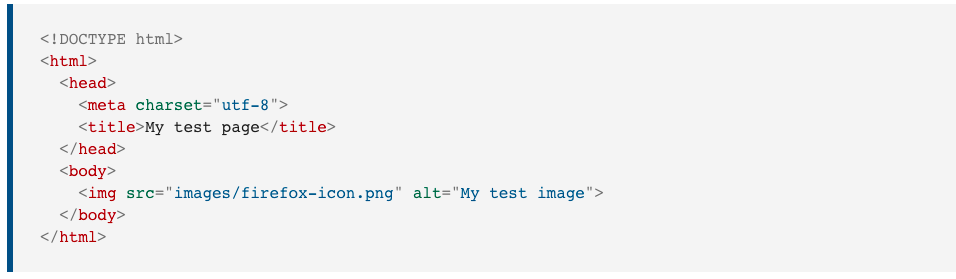
<!DOCTYPE html>— doctype. It is a required preamble. These days, they don’t do much and just basically needed to make sure your document behaves correctly.
<html></html>— the<html>element. This element wraps all the content on the entire page and is sometimes known as the root element.
<head></head>— the<head>element. This element acts as a container for all the stuff you want to include on the HTML page that isn’t the content you are showing to your page’s viewers. This includes things like keywords and a page description that you want to appear in search results, CSS to style our content, character set declarations, and more.
<meta charset="utf-8">— This element sets the character set your document should use to UTF-8 which includes most characters from the vast majority of written languages. Essentially, it can now handle any textual content you might put on it. There is no reason not to set this and it can help avoid some problems later on.
<title></title>— the<title>element. This sets the title of your page, which is the title that appears in the browser tab the page is loaded in. It is also used to describe the page when you bookmark/favorite it.
<body></body>— the<body>element. This contains all the content that you want to show to web users when they visit your page, whether that’s text, images, videos, games, playable audio tracks, or whatever else.
Headings
<h1>My main title</h1>
<h2>My top level heading</h2>
<h3>My subheading</h3>
<h4>My sub-subheading</h4>
Paragraphs
<p>This is a single paragraph</p>
Lists..
Unordered lists are for lists where the order of the items doesn’t matter, such as a shopping list. These are wrapped in a
<ul>element.
Ordered lists are for lists where the order of the items does matter, such as a recipe. These are wrapped in an
<ol>element.
Each item inside the lists is put inside an
<li>(list item) element.
Link
<a href="https://www.mozilla.org/en-US/about/manifesto/">Mozilla Manifesto</a>
Semantics is the meaning of a piece of code. For example “what effect does running that line of JavaScript have?”, or “what purpose or role does that HTML element have” (rather than “what does it look like?”.) Click here for more information on Semantics